
tutorial Node.js first application

Before creating actual "Hello, World!" application using Node.js, let
us see the parts of a Node.js application. A Node.js application
consists of following three important parts −
- Import required modules − We use require directive to load a Node.js module.
- Create server − A server which will listen to client's request similar to Apache HTTP Server.
- Read request and return response − server created in earlier step will read HTTP request made by client which can be a browser or console and return the response.
Creating Node.js Application
Step 1 - Import required module
We use require directive to load http module and store returned HTTP instance into http variable as follows −
var http = require("http");
Step 2: Create Server
At next step we use created http instance and call http.createServer() method to create server instance and then we bind it at port 8081 using listen
method associated with server instance. Pass it a function with
parameters request and response. Write the sample implementation to
always return "Hello World".
http.createServer(function (request, response) {

   // Send the HTTP header
   // HTTP Status: 200 : OK
   // Content Type: text/plain
   response.writeHead(200, {'Content-Type': 'text/plain'});

   // Send the response body as "Hello World"
   response.end('Hello World\n');
}).listen(8081);

// Console will print the message
console.log('Server running at http://127.0.0.1:8081/');
Above code is enough to create an HTTP server which listens ie. wait for a request over 8081 port on local machine.
Step 3: Testing Request & Response
Let's put step 1 and 2 together in a file called main.js and start our HTTP server as shown below −
var http = require("http");

http.createServer(function (request, response) {

   // Send the HTTP header
   // HTTP Status: 200 : OK
   // Content Type: text/plain
   response.writeHead(200, {'Content-Type': 'text/plain'});

   // Send the response body as "Hello World"
   response.end('Hello World\n');
}).listen(8081);

// Console will print the message
console.log('Server running at http://127.0.0.1:8081/');
Now execute the main.js to start the server as follows −
$ node main.js
Verify the Output. Server has started
Server running at http://127.0.0.1:8081/
Make a request to Node.js server
Open http://127.0.0.1:8081/ in any browser and see the below result.
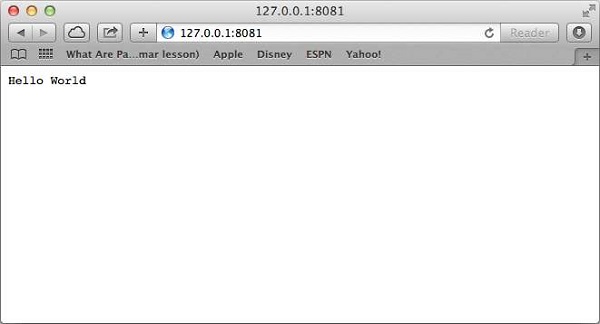
Congratulations, you have your first HTTP server up and running which is responding all the HTTP requests at port 8081.
tutorial Node.js first application
 Reviewed by Ali Mosbah
on
14:56
Rating:
Reviewed by Ali Mosbah
on
14:56
Rating:
Reviewed by Ali Mosbah
on
14:56
Rating:



No comments: